Financial clarity starts here with Granule.

A finance manager precise enough to answer the questions a balance never will, and private enough that the answers stay yours alone.

No account required Your data stays on device Set up in minutes
Granule home screen showing available balance and category budgets

Most apps tell you what you have. Granule tells you whether you're okay.

A balance on its own doesn't mean much. What you really want to know is the stuff underneath it: how much is safe to spend before payday, which categories are quietly running hot, whether this month is on track, and where the whole year lands if you keep going like this.

Granule works that out for you. It takes everything, day-to-day spending, the subscriptions that renew without asking, money you've lent out, accounts in other currencies, crypto, metals, and the receipts you'll want at tax time, and turns it into answers you can act on. No wall of charts, just a clear read on where you stand.

It does it without ever knowing who you are. No sign-up, no email, no copy of your finances sitting on anyone's server. It's your money, on your phone, and nowhere else.

See clearly

Every dollar mapped by day, category, and trend.

Plan ahead

Forecasts and pacing that look weeks down the road.

Stay private

On-device by default. Nothing to leak, nothing to sell.

Cover it all

Budgets, assets, loans, subscriptions, and tax in one app.

Everything you'd want from a finance app, and a few things you didn't know to ask for.

Eleven parts of Granule, and what each one actually does for you.

01 · Home

The one number that actually answers "can I afford this?"

Granule splits what you can spend (available balance) from what you simply hold (ledger balance), so the figure you act on is real money, free of rent and savings already spoken for. Expense and income categories fill as you spend against the budget you set for them, so a glance tells you how much of that line is left before you've gone over.

  • Spendable money and total holdings kept separate, so you never overcommit on a number that was never really free.
  • Category fills that show exactly how much of each budget you've used, turning deeper as a line gets closer to its limit.
  • Step into any past period in a tap to see how it really went.
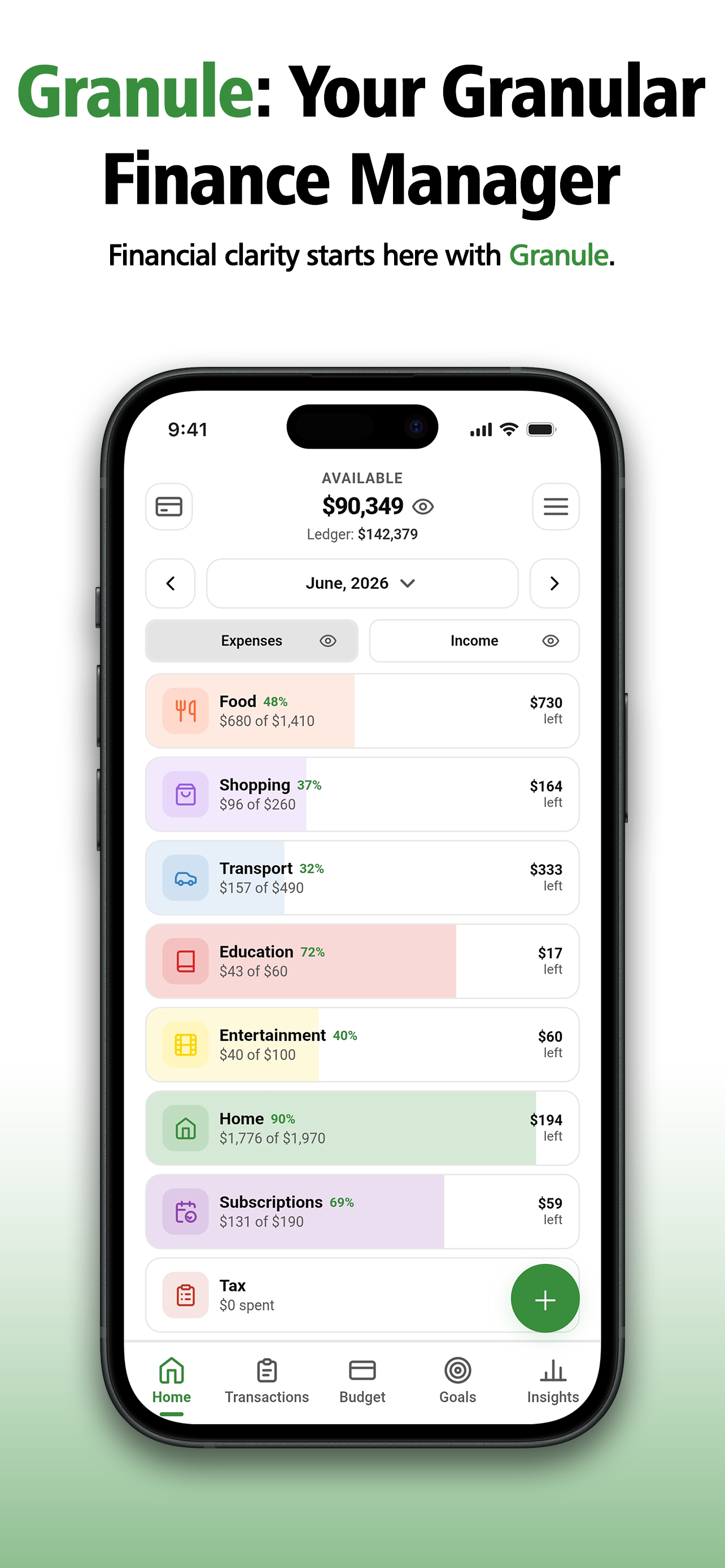
Granule home screen with available balance and category budgets
02 · Budget & heatmap

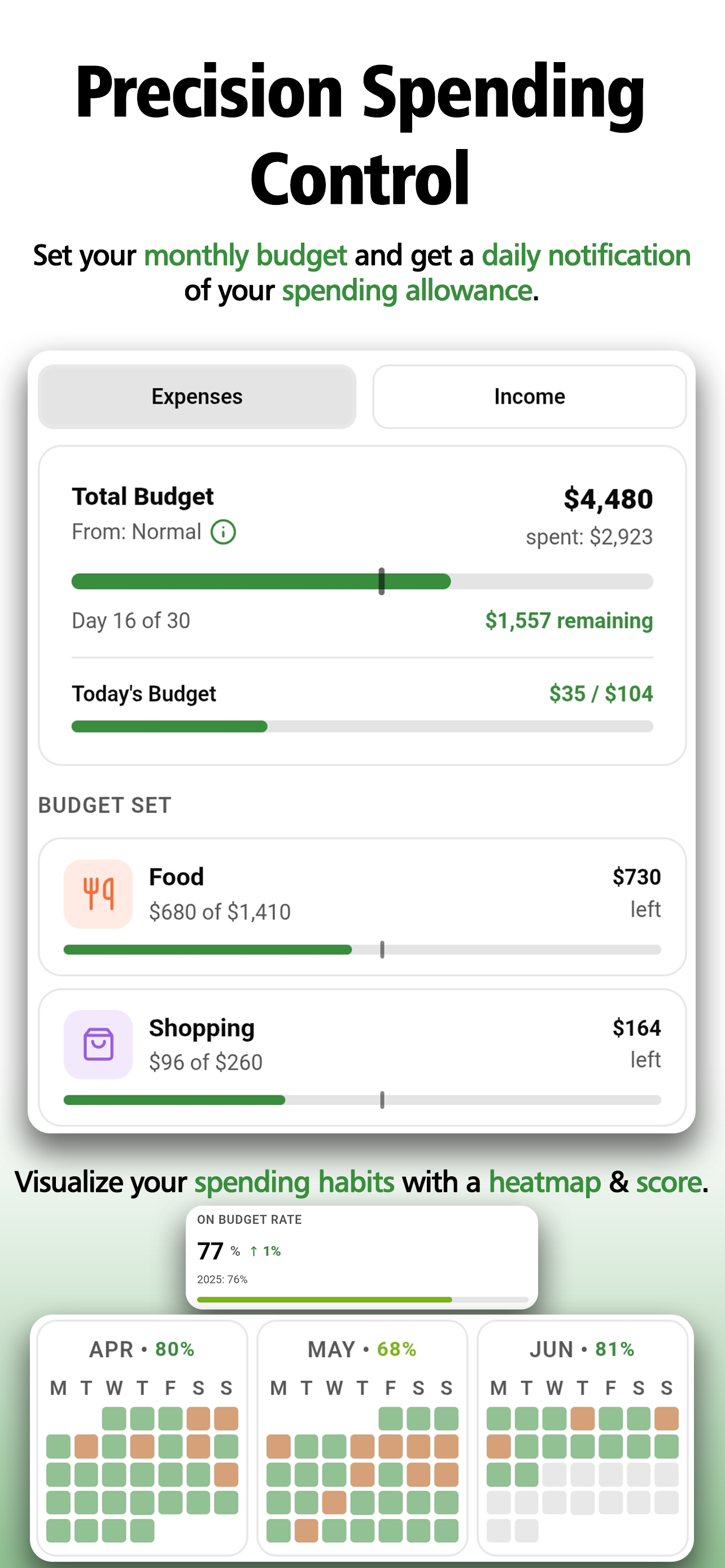
A daily number that keeps the month from getting away from you.

Granule takes your monthly budget and splits it into a daily figure, adjusting as you go so a heavy Tuesday tightens the rest of the week on its own. Over time those days build into a heatmap, an honest, at-a-glance record of how often you actually stay on plan.

  • A today's-spend figure that already accounts for everything you've spent so far this month.
  • An on-budget rate and a green-to-amber calendar that show your habits, not just today's slip.
  • A morning nudge with the day's number, so it reaches you before your card does.
Budget screen with daily allowance and a spending heatmap
03 · Financial health score

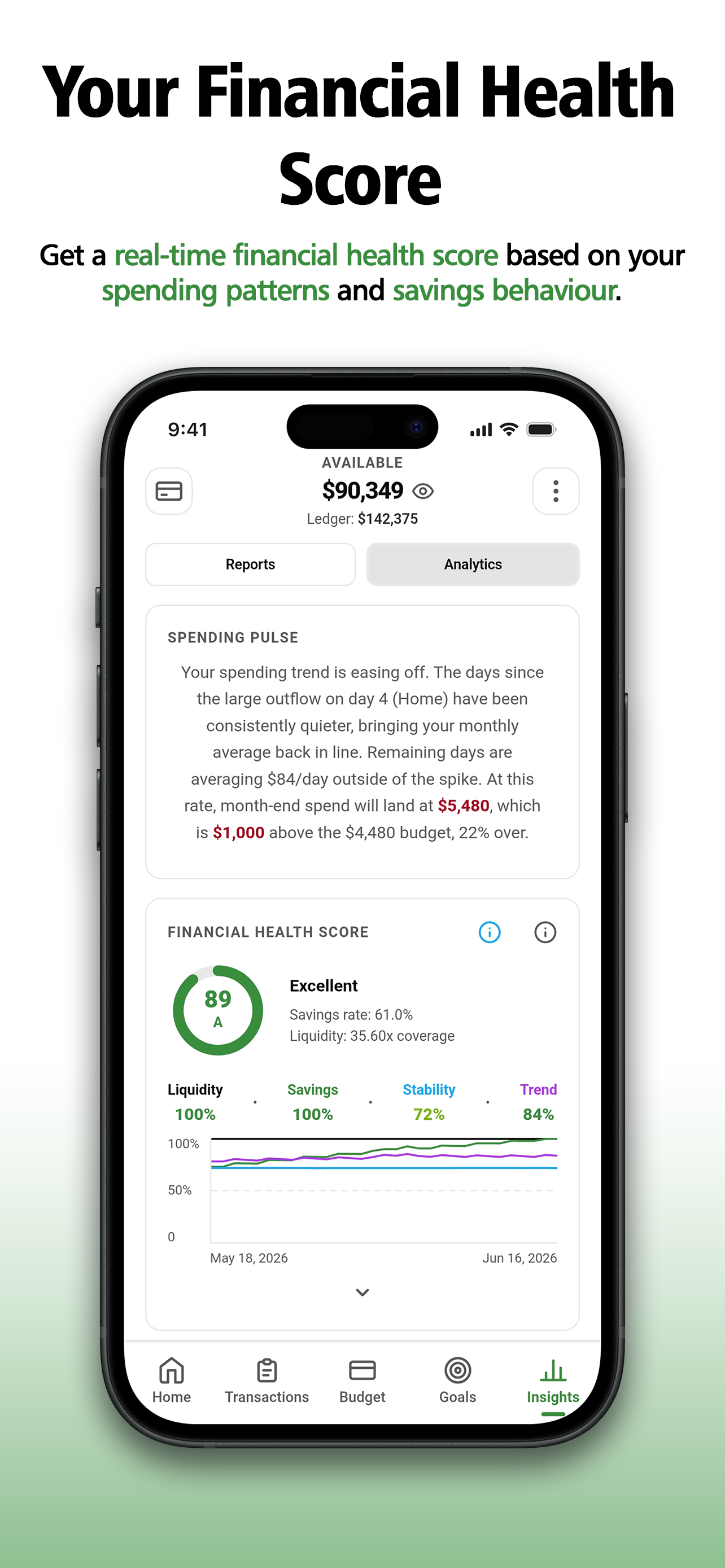
A second opinion on your money, every single day.

Granule weighs how liquid you are, how much you save, how steady your spending is, and which way the trend points, then gives you one score and tells you in plain words why. It's the gut-check most people only get from an advisor, except it updates while you sleep.

  • Liquidity, savings, stability and trend scored on their own, so you can see exactly what's carrying you and what's dragging.
  • A spending pulse that reads the month out loud and tells you where it's likely to finish.
  • A rolling graph so you're watching the direction, not just one day's reading.
Financial health score of 89 with liquidity, savings, stability and trend
04 · Financial forecast

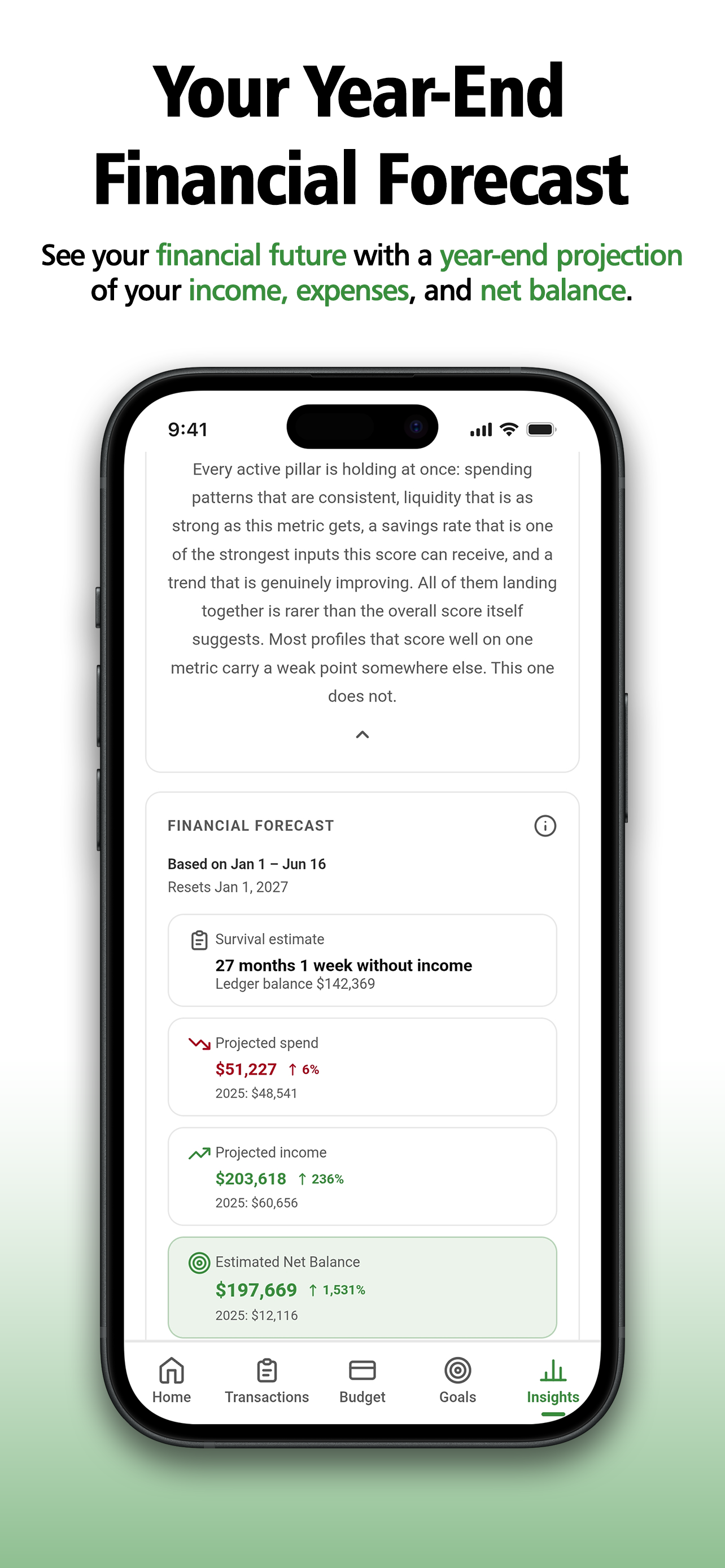
See December from where you're standing now.

Granule takes the year so far and projects where it's going: what you'll have earned, what you'll have spent, and what's left at the end. It even tells you how long you could coast with no income at all, the kind of number that quietly changes how you make decisions today.

  • Year-end income, spending and net balance projected from your real pace, each set against last year.
  • A survival estimate: how many months your savings would carry you if the income stopped tomorrow.
  • Year-on-year movement, so you can tell real progress from a good month.
Financial forecast with projected spend, income, net balance and survival estimate
05 · Subscriptions

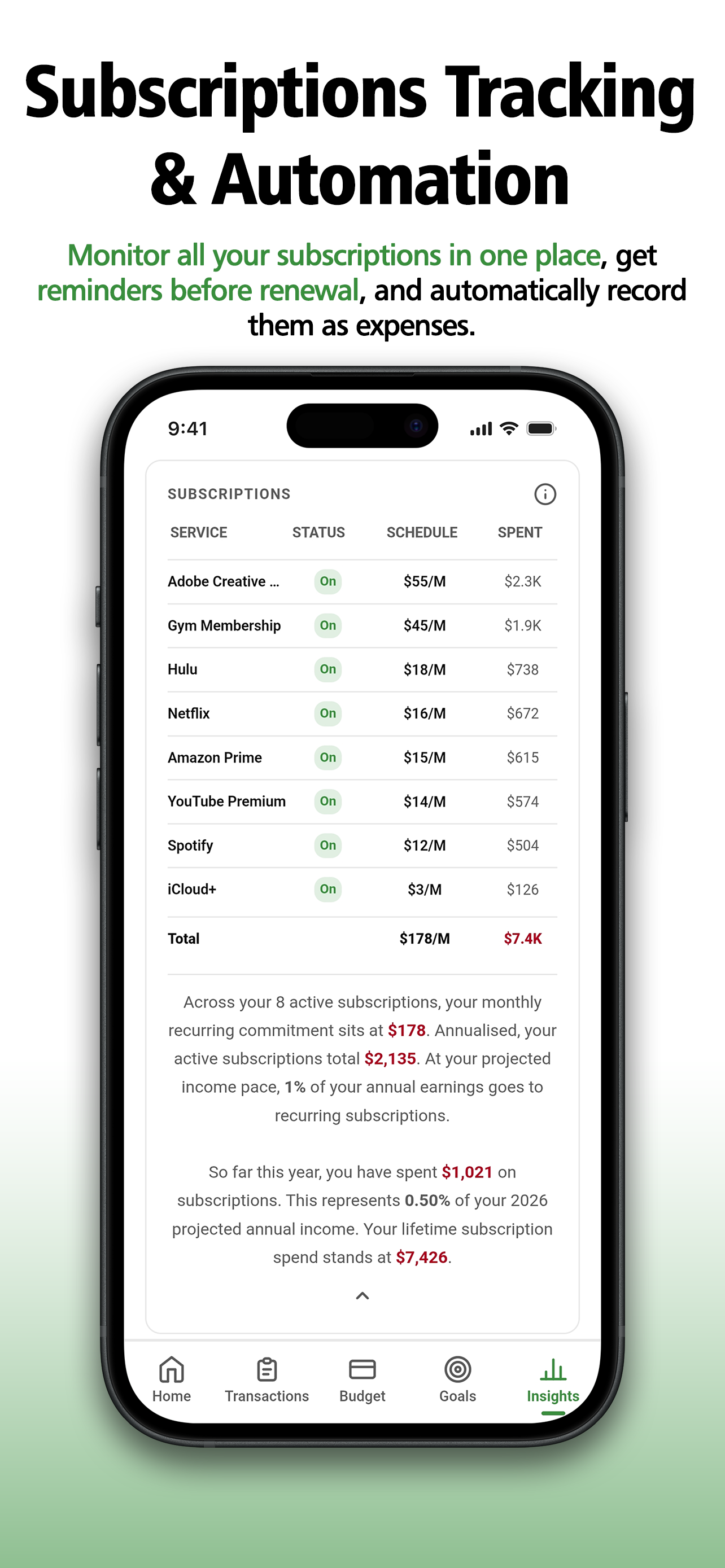
Find out what those little monthly charges really cost.

Streaming, the gym, that app you forgot about, all in one list with what you pay, when it renews, and what it's cost you over its lifetime. Granule adds up your monthly commitment, shows the slice of your income it's eating, and logs each renewal as an expense on its own so your budget never lies to you.

  • A running monthly and yearly total, plus the percentage of your income going to things that renew on their own.
  • A heads-up before a renewal hits, while you can still decide to keep it or kill it.
  • Each charge recorded automatically, so you're never hand-entering the same bill every month.
Subscriptions table with status, schedule and spend totals
06 · Net worth & assets

Fiat, foreign currencies, crypto, precious metals, and other assets, in one running total.

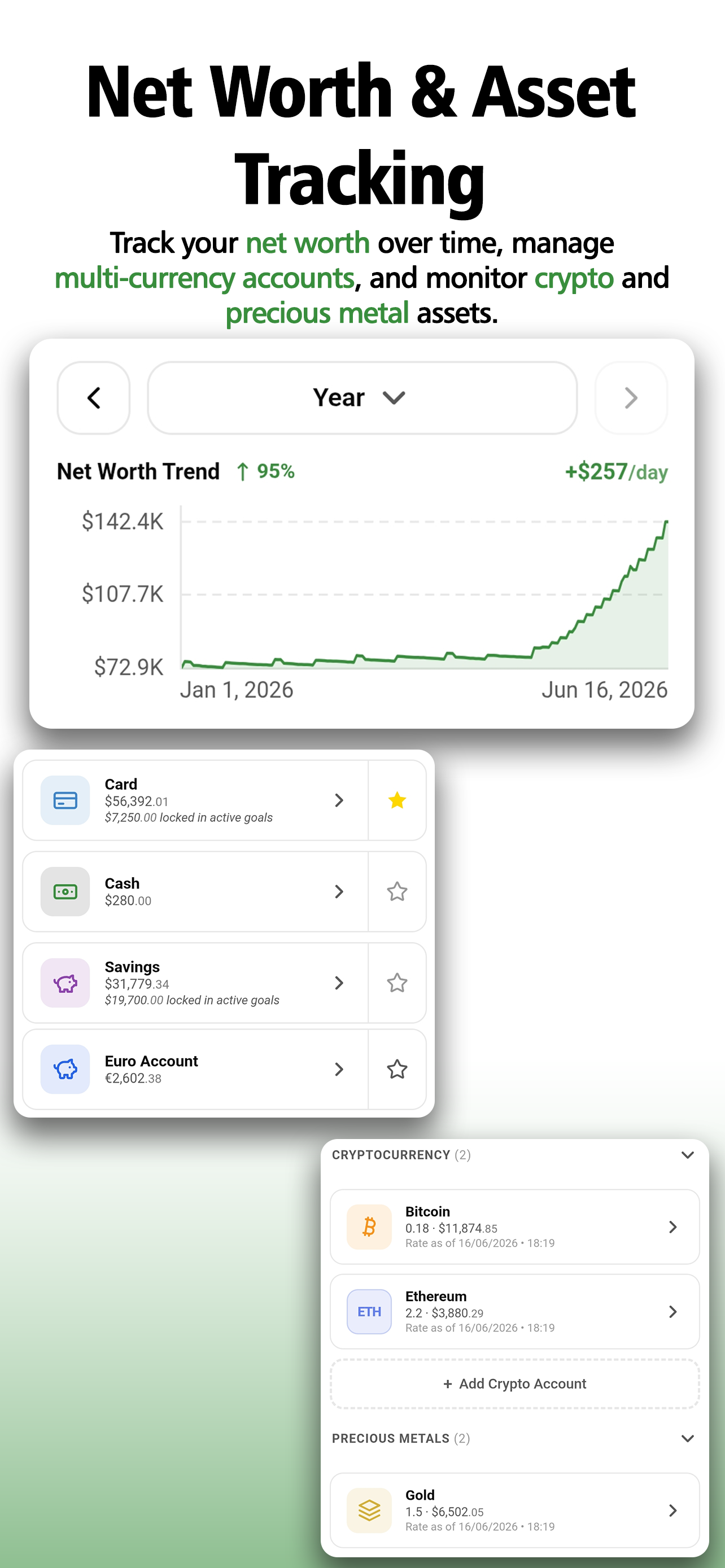
Your accounts and foreign-currency balances form the core, and Granule lets you stack cryptocurrencies, precious metals, and other assets on top: houses, cars, anything you own that has a worth. Each one is valued at what you say it's worth or at live rates, and they all roll up into a single net-worth number that moves in real time.

The Net Worth Trend is the chart you've always wanted for your money. It plots how your total wealth has moved every day across whatever period you choose, and you can switch between week, month, year, and all-time to zoom from the last few days all the way out to the full arc of your financial life. The trend and the daily change rate sit right at the top, so the direction of travel is the first thing you see.

When an asset converts to liquid money, Granule handles that too: log the sale amount, choose where it lands, and the asset clears off your balance while the proceeds get recorded as income.

  • A net-worth trend with daily movement and growth over the period, switchable across week, month, year and all-time.
  • Accounts in any currency at the heart of it, with Bitcoin, Ethereum, gold and silver added on top at current prices.
  • Money tied up in active goals marked as locked, so reserved funds stay reserved in your head too.
Net worth trend chart with multi-currency accounts, crypto and metals
07 · Goals

Put a number and a date on the thing you're saving for.

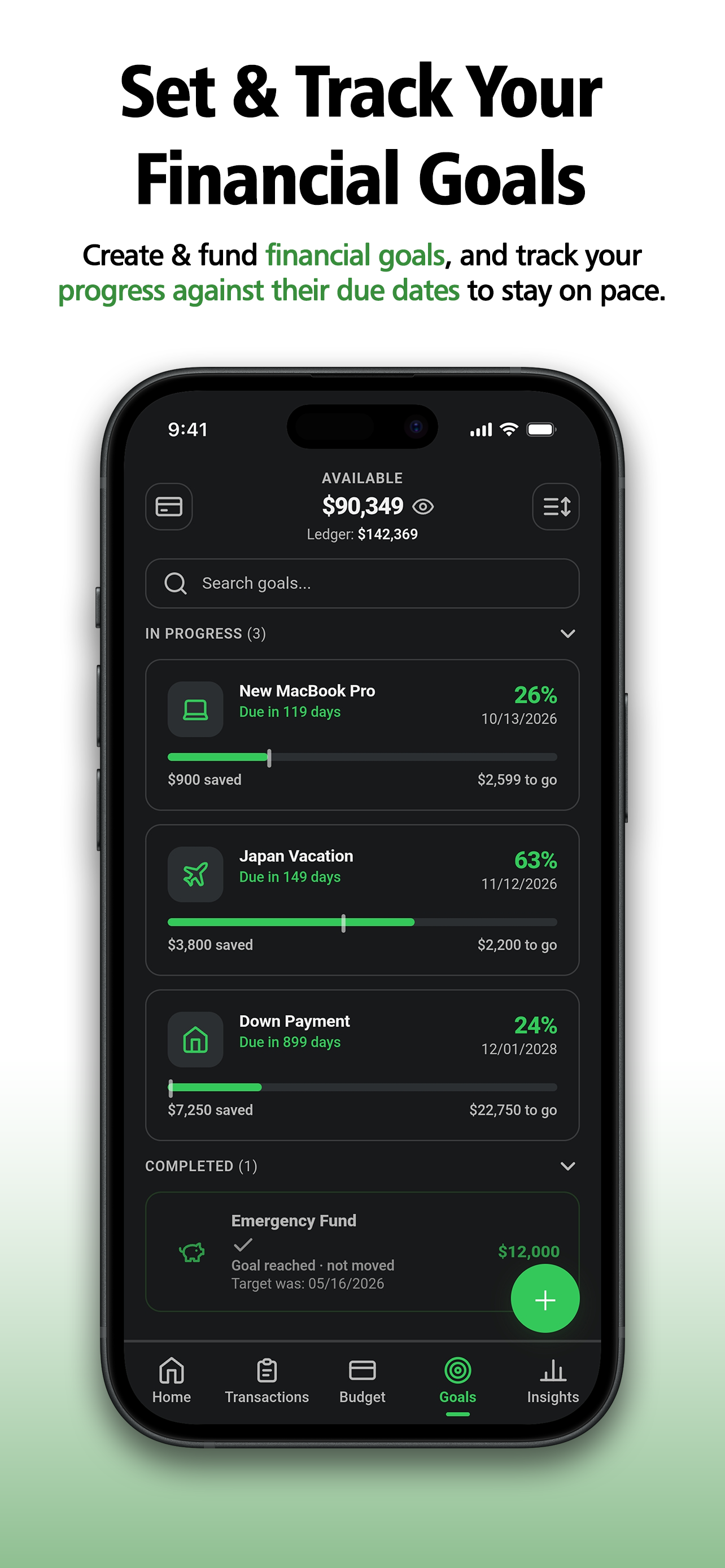
Name a goal, set the target, fund it as you go, and Granule shows you the percentage done, what's saved, what's left, and whether you're on pace for the date you picked. Reach it and it moves to completed, so the wins don't just quietly disappear into your balance.

  • Every goal showing percent complete, amount saved, amount to go, and the days left until its due date.
  • In-progress and completed kept apart, so finished goals stay on the board as a record, not clutter.
  • Funds parked in a goal flagged as locked across the app, so saved money isn't mistaken for spendable.
Goals screen with progress, due dates and amounts saved
08 · Transactions

Pick any stretch of time and see what it did to your balance.

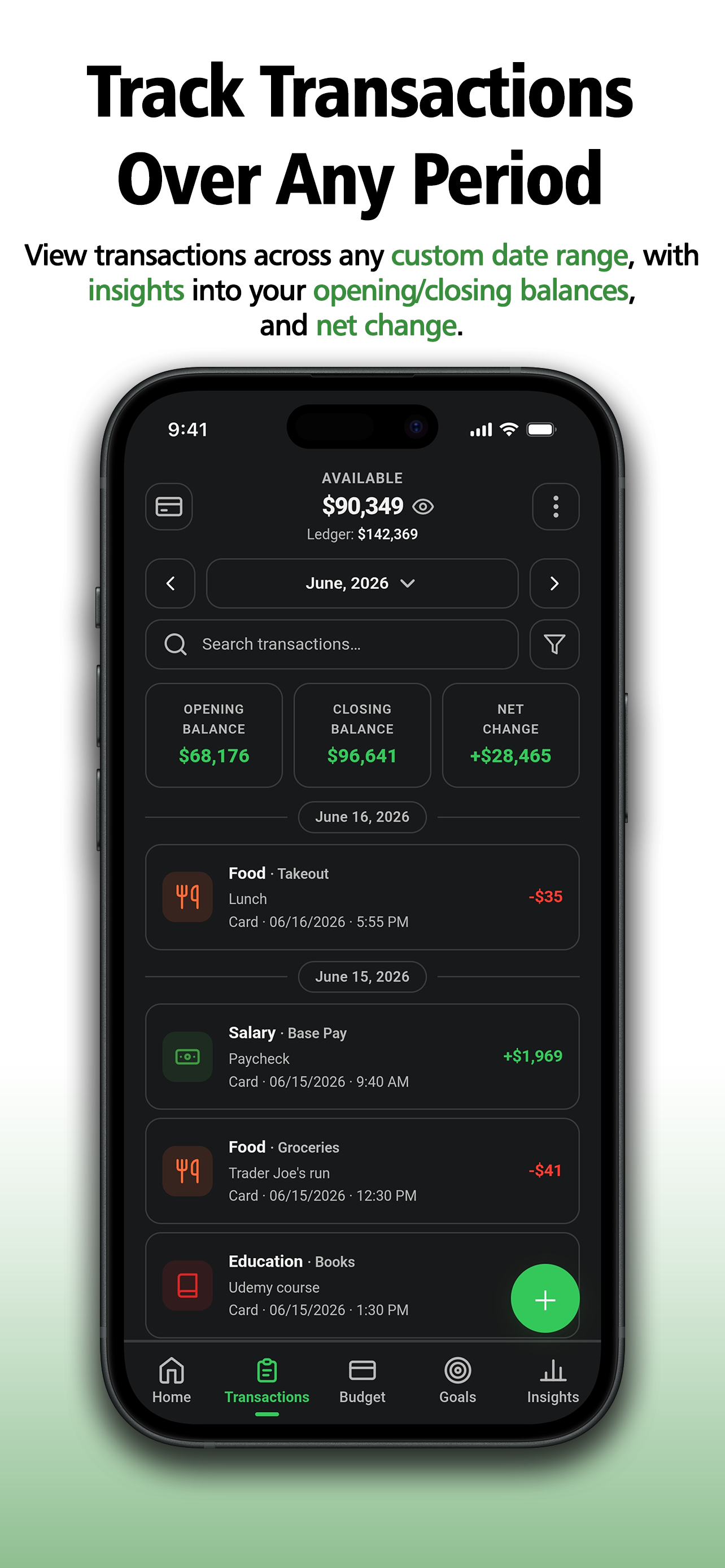
Choose a week, a month, or a custom range, and Granule frames it with the numbers that actually answer the question: what you started with, what you ended with, and the net swing between. Search, filter, and open any entry down to the account, time, and subcategory.

  • Opening balance, closing balance and net change for whatever window you choose.
  • Search and filter that surface any entry in seconds, no endless scrolling.
  • Every line carries its category, subcategory, account, date and time, the full story, not just an amount.
Transactions over a custom date range with opening, closing and net change
09 · Reports

Stop guessing where it went. Know.

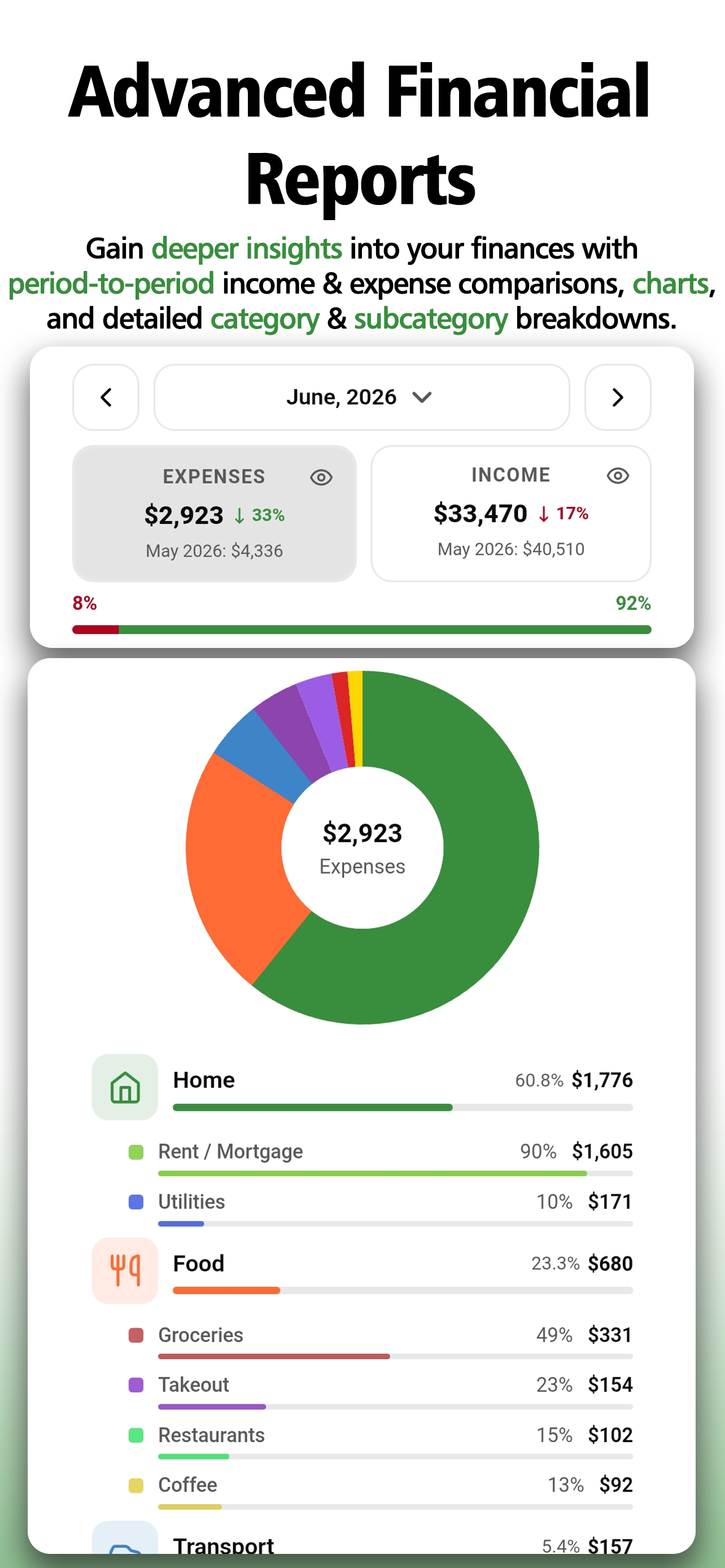
Put this month against last for income and spending, then read the breakdown beneath the donut chart: each category laid out, and under it the subcategories, down to the exact line that's quietly the biggest. It's the difference between a hunch about your money and a breakdown you could hand to anyone.

  • Side-by-side comparison of any two periods, with the change spelled out for income and expenses.
  • A donut chart that makes the shape of a month obvious before you've read a single figure.
  • A full breakdown from category to subcategory, so the line item behind a busy month is right there.
Advanced reports with period comparison, donut chart and category breakdown
10 · Tax reports

Tag it once. The report writes itself.

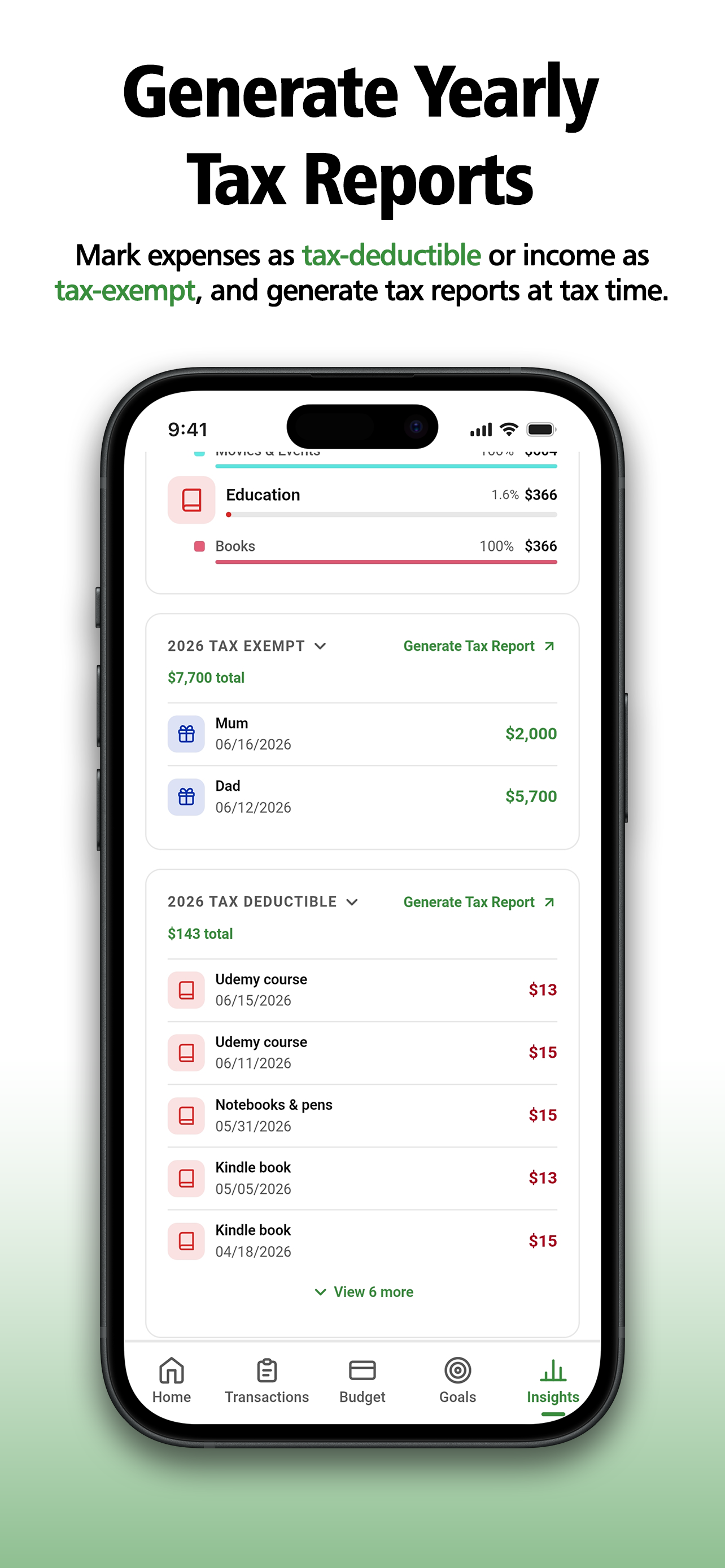
Mark an expense as tax-deductible or an income as tax-exempt when you add it, and Granule quietly files it away. That's all there is to do. Every tagged transaction flows into the report automatically, so the year is always building in the background without you thinking about it. When you need the report, it's already there, completely up to date, ready to generate and hand to your accountant in a tap.

  • Tag as you go, so there's no shoebox and no late-night sorting in April.
  • Switch between any year inline, with a running total and every entry in date order.
  • Generate a polished report, zoom in to check it, and share it on in a tap.
Tax exempt and tax deductible sections with year selector and generate report
11 · Loans given & taken

Never be the one who forgets who owes who.

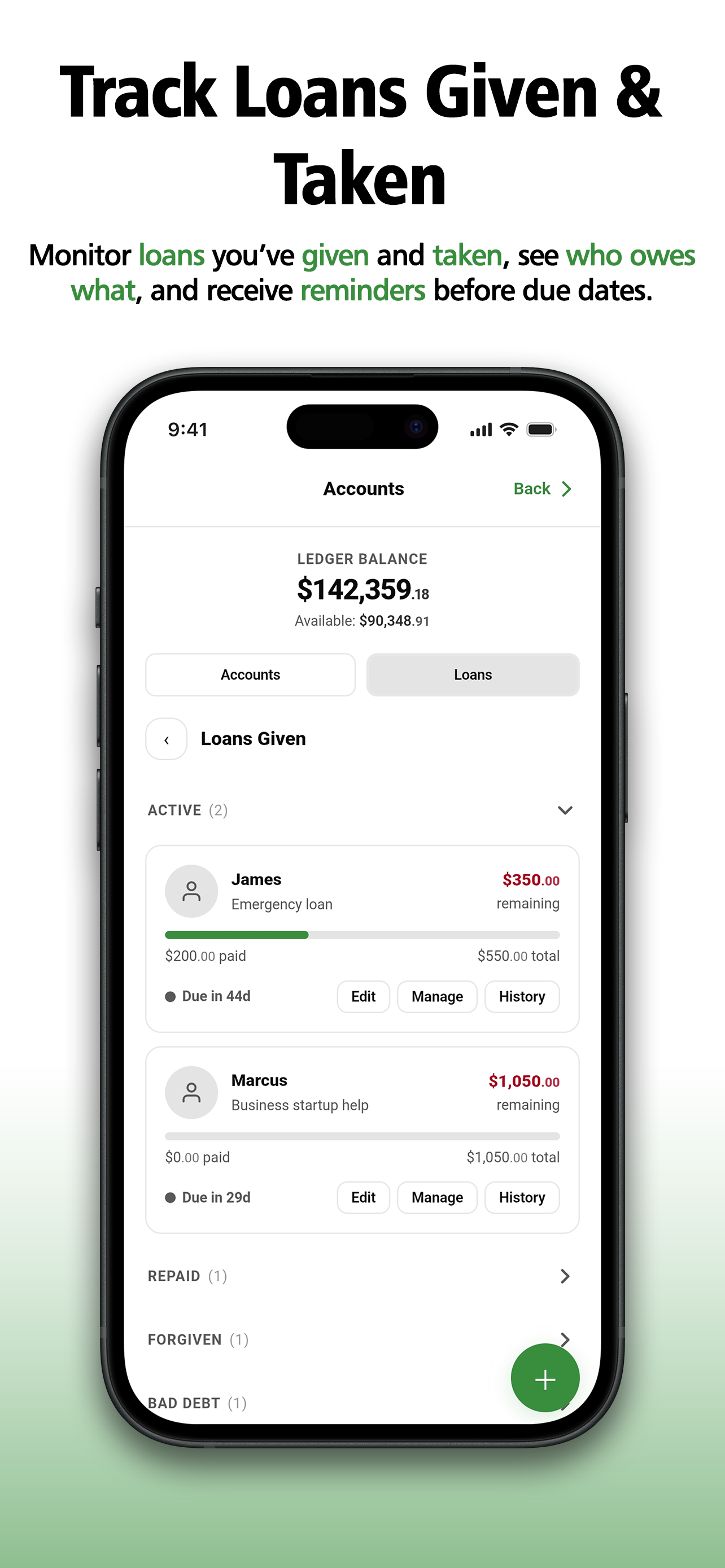
Money you've lent and money you've borrowed, both tracked properly, with how much has been paid back and how much is still out. Granule nudges you before a due date, so the loan gets settled instead of slowly turning into the thing nobody mentions.

  • Given and taken side by side, each showing paid against total at a glance.
  • Clear status on every loan, active, repaid, forgiven, or written off as bad debt.
  • A reminder before each due date, so nothing gets quietly forgotten into a loss.
Loans given screen with active loans, progress and due dates

Your money is nobody's business but yours.

There's no account to make and no server holding your records. Everything you enter stays on your phone. The only time Granule goes online is to grab live exchange rates and validate Pro access, never to read, collect, or upload a thing you've typed.

On-device storage

Your transactions, balances and notes never leave your phone.

No account, no inbox

Nothing to sign up for, nothing to hand over, nothing to track you by.

Internet only when asked

Live FX rates and Pro access validation, that's the entire list.

Get the full picture today.

Download Granule and see exactly where your money stands, clearly, privately, in minutes.